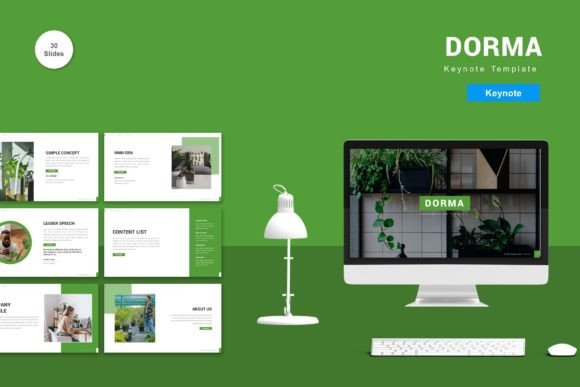
Dorma - Keynote Template for Professional Presentations
In the world of digital storytelling, the difference between a forgettable slide deck and a compelling narrative often comes down to design execution. For entrepreneurs, educators, and creative professionals, finding a tool that balances aesthetic appeal with functional flexibility is a constant challenge. The Dorma - Keynote Template addresses this need directly by offering a robust framework designed for both business and personal needs. It is not merely a collection of slides; it is a structured environment where your content takes center stage, supported by a clean, modern interface that works as hard as you do.
What makes Dorma particularly interesting is its commitment to total editability. Too often, presentation templates feel rigid, forcing users to contort their ideas to fit pre-set boxes. With Dorma, the process is reversed. You input your content, replace placeholder images with your own high-resolution assets, and adjust the color palette to match your brand identity. This level of control ensures that every presentation feels authentic to the presenter while maintaining a polished, professional look that captivates the audience from the very first frame.
A Foundation Built on Flexibility and Design
The core strength of the Dorma - Keynote Template lies in its comprehensive structure. Boasting 150 total slides across five premade color schemes, it offers a breadth of options that can adapt to almost any scenario. Whether you are pitching a startup idea to investors, delivering a quarterly report to stakeholders, or teaching a complex subject to students, the sheer volume of layouts ensures you never run out of suitable formats. These 30 useful slide types cover everything from data visualization and team introductions to timeline tracking and product showcases.
Design consistency is crucial for maintaining audience focus. Dorma achieves this through vector-based master slides. Unlike raster images that lose quality when resized, vector graphics remain crisp and clear at any resolution. This technical foundation means your presentations will look sharp on a small laptop screen during a remote meeting just as they do projected onto a massive wall at a conference hall. The inclusion of recommended free web fonts further streamlines the workflow, ensuring typography remains legible and stylish without requiring users to hunt for licensed typefaces.
Tailoring the Experience for Different Audiences
One size rarely fits all in the realm of communication. A pitch deck for a tech startup requires a different energy than a lecture for a history class or a portfolio review for a graphic designer. The Dorma - Keynote Template excels here because of its five premade colors. Each color scheme evokes a different mood and serves a distinct purpose. A deep blue might convey trust and stability for a financial presentation, while a vibrant orange could inject energy into a marketing launch. By simply switching the master theme, users can instantly reorient the tone of their entire deck without redesigning individual elements.
For freelancers and small business owners, time is a scarce resource. The ability to drag and drop content easily saves hours of manual formatting. Imagine preparing a client proposal: instead of wrestling with alignment guides and text boxes, you can focus on refining your value proposition. The template handles the visual heavy lifting, allowing you to concentrate on the substance of your message. This efficiency is not just about speed; it is about reducing cognitive load so that creativity can flourish where it matters most—in the strategy and the story.
Creative Applications Across Industries
The versatility of Dorma extends far beyond standard corporate reporting. Educators can utilize the animated slides to bring static concepts to life, using transitions to reveal information step-by-step and keep students engaged. Marketers can leverage the image placeholders to showcase case studies, before-and-after transformations, or user-generated content, creating a dynamic visual flow that tells a customer journey story. Bloggers and publishers can use the layout structures to present research findings or outline upcoming content strategies with clarity and impact.
Consider the application for a wedding planner or an event coordinator. While these roles are personal in nature, they require professional-grade proposals to secure clients. Dorma provides the necessary polish to present itineraries, venue options, and budget breakdowns in a way that inspires confidence. The "Readme First" guide included in the package ensures that even those with limited design experience can navigate the file structure, customize the elements, and produce a result that looks like it came from a top-tier agency.
Hobbyists and creatives also benefit from the organized chaos that often plagues inspiration boards. By using the various slide layouts, artists can curate mood boards, photographers can display portfolios, and writers can visualize plot structures. The template acts as a canvas that imposes just enough order to make the work digestible without stifling the unique voice of the creator. The animated slide features add a layer of interactivity that can turn a simple slideshow into an engaging visual experience, holding attention spans in an era of short attention windows.
Practical Strategies for Effective Customization
To get the most out of the Dorma - Keynote Template, it is essential to approach customization with intention. Start by selecting the color scheme that best aligns with your brand guidelines or the emotional response you wish to elicit. Once the base is set, replace the placeholder images with high-quality, relevant photography. Generic stock photos can dilute the impact of a presentation; specific, authentic imagery builds connection. Ensure that your text is concise. The template provides ample space, but resist the urge to fill every inch. White space is a powerful design element that allows key points to breathe and be absorbed by the audience.
Consistency is another pillar of effective presentation design. Use the master slides to maintain uniform headers, footers, and logo placements throughout the deck. This creates a cohesive narrative thread that guides the viewer through your logic. When incorporating data, choose the chart styles within the 150 slides that best represent your numbers without clutter. If a slide feels crowded, split the information across two frames. The goal is clarity, not density. Remember that the animation features should serve the narrative, not distract from it. Use them to emphasize transitions or reveal critical insights, rather than as mere decoration.
The included five Keynote files offer a widescreen format that matches modern display standards. This ensures compatibility with contemporary projectors and monitors, eliminating the awkward black bars or cropping issues that plague older templates. By adhering to these practical guidelines, users can transform the Dorma - Keynote Template from a static asset into a dynamic communication tool. It empowers individuals to present their ideas with confidence, knowing that the visual delivery is as strong as the content itself.
Ultimately, the value of Dorma lies in its ability to democratize professional design. It removes the barriers of entry for those who have brilliant ideas but lack the time or training to execute them visually. Whether you are launching a new product, teaching a course, or sharing a personal milestone, this template provides the structure to make your message resonate. It invites you to focus on what you know best—your expertise and your story—while handling the complexities of layout, color theory, and typography in the background. In a digital landscape crowded with noise, a clear, well-designed presentation is your strongest signal.