Carval - Keynote Template: A Practical Evaluation for Modern Presenters
In the landscape of professional communication, the visual delivery of information is often as critical as the data itself. For Mac users relying on Apple’s native presentation software, finding a balance between aesthetic sophistication and functional flexibility can be challenging. This is where specialized design resources like Carval - Keynote Template enter the conversation. Rather than serving as a mere collection of static backgrounds, this template functions as a comprehensive design system intended to streamline the creation process for both business professionals and personal users.
Understanding whether Carval is the right tool for your specific needs requires looking beyond the surface-level graphics. It involves evaluating its structural integrity, editability, and how it compares to building slides from scratch or using generic alternatives. This analysis explores the features, practical applications, and limitations of the Carval template to help you make an informed decision about your presentation toolkit.
Core Architecture and Design Flexibility
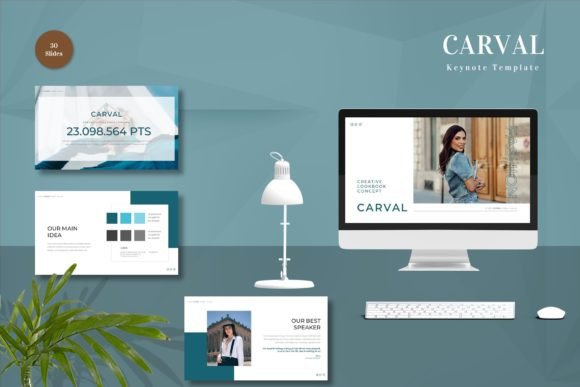
The primary value proposition of any presentation template lies in its adaptability. A rigid design that forces content into awkward layouts often does more harm than good. Carval - Keynote Template addresses this by offering a structure built on master slides. This technical foundation is crucial because it ensures consistency across all 150 included slides. When you modify a font style or color scheme in the master view, those changes propagate throughout the entire deck, saving significant time during the revision phase.
One of the distinct features of this package is the inclusion of five premade color variations. In professional settings, brand alignment is non-negotiable. Having multiple color palettes allows users to select a base that closely matches their corporate identity or personal brand without needing advanced graphic design skills. Furthermore, the template utilizes vector-based elements. Unlike raster images, which can pixelate when resized, vector graphics maintain crisp edges at any scale. This is particularly important for high-resolution displays and large projection screens where clarity is paramount.
The template also emphasizes ease of use through a "drag and drop" philosophy. For users who are not proficient in complex design software, the ability to simply replace placeholder images and input text directly into predefined zones reduces the cognitive load associated with slide creation. The inclusion of animated slides adds a layer of dynamism, allowing presenters to guide audience attention sequentially rather than overwhelming viewers with static blocks of text.
Comparing Custom Design vs. Templated Solutions
When deciding whether to invest in a resource like Carval, it is helpful to weigh it against the two primary alternatives: hiring a professional designer or building slides manually using basic shapes and stock assets.
Hiring a designer offers unparalleled customization but comes with high costs and longer turnaround times. It is a viable option for high-stakes pitches where every pixel must be unique, but it is often impractical for routine weekly reports or internal updates. On the other hand, building slides from scratch provides total freedom but demands a significant time investment and a keen eye for design principles such as whitespace, hierarchy, and color theory. Many professionals find themselves stuck in the middle, producing inconsistent decks that lack polish.
Carval - Keynote Template occupies the middle ground effectively. It provides the polish of a professional design with the speed of a pre-built framework. The tradeoff is a degree of uniformity; while editable, the underlying grid and layout structures remain consistent. For most business and personal needs, this consistency is actually a benefit, as it creates a cohesive narrative flow. However, for projects requiring radical artistic deviation, the template may feel restrictive.
Evaluating the Content Scope and Usability
The package includes 30 useful slide types within the broader set of 150 total slides. This distinction is important. While 150 slides sound abundant, many are variations of core layouts—such as team introductions, data charts, timeline views, and contact pages. The "30 useful slides" refer to the unique structural archetypes that cover the majority of presentation scenarios.
For a marketing manager, the pre-designed chart slides can save hours of formatting Excel data into visually appealing graphs. For an educator, the clean typography and structured bullet points facilitate clear information dissemination. The recommendation to use free web fonts is a thoughtful inclusion. It ensures that if the presentation file is shared with colleagues who do not have specific premium fonts installed, the layout will not break. This portability is a critical factor for collaborative environments.
However, users should note that preview images are not included in the final download. This is standard practice for digital templates to protect intellectual property, but it means users must rely on the product page visuals for initial assessment. Additionally, the requirement to read the included readme file cannot be overstated. Understanding how the master slides are organized and how the animations are triggered is essential for leveraging the template’s full potential. Skipping this step often leads to frustration when elements do not behave as expected.
Best-Fit Scenarios and Limitations
Identifying when to use Carval - Keynote Template depends largely on the nature of your presentation and your technical comfort level. This tool is ideally suited for:
- Corporate Reporting: The clean, professional aesthetic aligns well with quarterly reviews and stakeholder updates where clarity trumps flashiness.
- Startup Pitches: The animated elements and modern vector graphics can help convey innovation and energy without appearing unprofessional.
- Educational Materials: Teachers and trainers can benefit from the structured layouts that help organize complex topics into digestible segments.
- Personal Portfolios: Creatives can use the image placeholders to showcase work in a gallery-style format that feels curated rather than cluttered.
Conversely, there are situations where this template may not be the optimal choice. If your presentation relies heavily on complex, custom data visualizations that require dynamic linking to live databases, a static template may require too much manual updating. Similarly, if you are presenting in an environment that does not support Keynote files natively, you will need to convert the deck to PowerPoint or PDF. While Keynote exports are generally reliable, some animations and specific font renderings may shift during conversion, potentially altering the intended visual impact.
Making the Final Decision
Choosing a presentation template is ultimately about efficiency versus expression. Carval - Keynote Template leans heavily toward efficiency without sacrificing a high level of visual expression. It removes the blank canvas anxiety that plagues many presenters, providing a scaffold upon which to build compelling narratives.
Before purchasing, consider your workflow. Do you frequently create presentations? If so, the time saved by using master slides and pre-formatted charts will likely justify the cost quickly. Are you comfortable with Keynote’s interface? Since this is a Keynote-specific product, familiarity with Apple’s ecosystem is assumed. If you are a Windows user primarily working in PowerPoint, this template will not be compatible unless you are willing to navigate the complexities of cross-platform conversion, which is generally not recommended for preserving design fidelity.
The inclusion of widescreen formats ensures compatibility with modern projectors and monitors, addressing a common oversight in older template designs. The five premade colors offer enough variety to prevent fatigue if you use the template repeatedly for different clients or projects. By changing the color theme, the same structural layout can feel entirely fresh, extending the lifespan of the purchase.
In conclusion, Carval - Keynote Template represents a robust resource for those seeking to elevate their presentation quality without investing in bespoke design services. It is not a magic solution that writes content for you, but it is a powerful tool that organizes your content effectively. For adults aged 20–50 navigating professional and personal communication demands, it offers a balanced blend of aesthetics and functionality. By understanding its features, respecting its limitations, and utilizing its editable components wisely, users can transform standard presentations into engaging visual experiences.