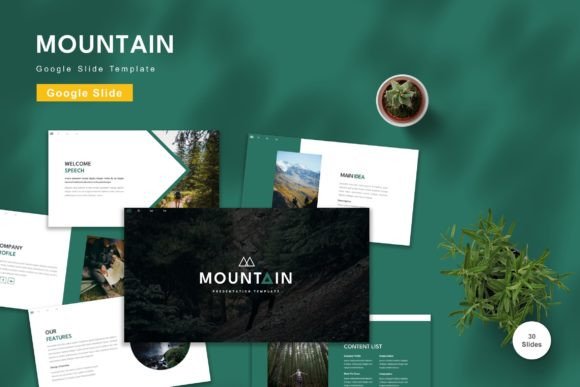
Cehara - Google Slide Template: Elevate Your Presentations with Style and Ease
In the fast-paced world of professional communication, the difference between a presentation that gets ignored and one that drives action often comes down to design. You might have groundbreaking ideas or critical data, but if your slides look cluttered or outdated, your message can get lost. This is where Cehara - Google Slide Template steps in as a powerful ally for anyone looking to streamline their visual storytelling without needing a degree in graphic design. Whether you are pitching to investors, teaching a workshop, or updating your team, having a robust, editable framework can save hours of frustration.
Many users find themselves stuck in the "blank slide" paralysis, spending more time fiddling with fonts and alignment than refining their actual content. Cehara solves this by offering a complete ecosystem of 150 total slides, all built on a vector-based master structure. This means every element is fluid and responsive. When you download Cehara - Google Slide Template, you aren't just getting a static image; you are getting a dynamic tool where you can input your content, replace placeholder images with your own branding, and adjust color schemes to match your identity instantly.
Real-World Scenarios Where Cehara Shines
The true value of a template becomes apparent when applied to specific, high-stakes situations. Let's explore how different professionals utilize this resource to meet their unique needs.
The Startup Founder Pitching Investors
Imagine you are a founder preparing for a crucial pitch deck. Investors see dozens of decks a day; yours needs to stand out immediately while maintaining a sense of corporate trustworthiness. With Cehara - Google Slide Template, you can leverage its 30 useful slides specifically designed for business narratives. These include sections for problem statements, market analysis, financial projections, and roadmaps. The ability to switch between 5 premade colors allows you to align the deck perfectly with your startup's brand guidelines in seconds. Instead of worrying about whether your charts look professional, you can focus entirely on the story of your company's growth potential.
The Educator or Corporate Trainer
For educators and trainers, engagement is key. Long lectures filled with text-heavy slides are a recipe for losing an audience. Cehara offers animated slides that add a layer of interactivity and visual interest without being distracting. If you are running a workshop on leadership skills or teaching a complex technical subject, the variety of layouts helps break up information into digestible chunks. The "drag and drop" functionality makes it incredibly easy to insert diagrams, photos from previous sessions, or student work, making the presentation feel personal and relevant to the room.
The Marketing Team Launching a Campaign
Marketing teams often need to present campaign strategies, social media calendars, and performance metrics. The widescreen format included in the 5 Google Slide files ensures that your visuals pop on modern projectors and large monitors. Because the template is fully editable, you can quickly swap out generic stock photos for high-resolution images of your latest product launch. The vector-based nature of the graphics ensures that even when you resize elements to fit a new layout, they remain crisp and clear, avoiding the pixelation issues that plague many standard presentations.
Tailoring the Experience for Different Industries
One size rarely fits all, which is why the flexibility of Cehara - Google Slide Template is such a significant asset across various sectors.
- Consulting and Strategy: Consultants rely on clean, data-heavy slides. The structured layouts in Cehara provide ample space for graphs and bullet points while maintaining a sophisticated aesthetic. The recommended free web fonts ensure readability, which is crucial when presenting complex strategic frameworks.
- Creative Agencies: Designers and creative directors need templates that don't look like templates. The 5 premade color options allow agencies to create distinct looks for different clients, from bold and vibrant for a tech startup to muted and elegant for a luxury brand. The ability to change colors globally means you can rebrand a presentation for a new client in minutes.
- Non-Profit Organizations: Non-profits often operate with limited budgets for design software. Cehara provides a premium look without the premium price tag. It allows these organizations to present their impact stories, donor reports, and mission updates with the polish usually reserved for large corporations.
Understanding the User Experience
Using a template should feel empowering, not restrictive. A common concern among users is whether a pre-made design will limit their creativity. With Cehara, the experience is quite the opposite. The "Readme First" file included in the package serves as a quick guide, ensuring you understand how to navigate the master slides and unlock the full potential of the 150-slide library.
When you open the file in Google Slides, you'll notice the intuitive organization. The master slides control the global elements, meaning if you decide to change your primary font or logo placement, it updates across the entire deck automatically. This consistency is vital for maintaining a professional appearance. Furthermore, the inclusion of animated transitions adds a modern touch. These animations are subtle enough to keep the flow natural but noticeable enough to emphasize key points during a live presentation.
Practical Considerations Before You Start
While Cehara - Google Slide Template is highly versatile, there are a few practical things to keep in mind to get the most out of it.
First, consider your audience's environment. Since the template includes widescreen formats, ensure your presentation venue supports this aspect ratio. Most modern projectors and screens do, but checking beforehand prevents awkward cropping. Second, take advantage of the 5 premade colors early in your process. Deciding on your color palette before filling in the content helps maintain visual harmony throughout the deck. Finally, remember that while the preview images give you an idea of the layout, they are not included in the final download. You will be working with placeholders, so have your own assets ready to go.
Another consideration is the balance between customization and efficiency. While you can edit every single element, trying to redesign every slide from scratch defeats the purpose of using a template. The strength of Cehara lies in its pre-designed logic. Use the existing structures as a foundation and tweak them to suit your narrative rather than rebuilding the wheel.
Why Choose Cehara Over Custom Design?
Hiring a designer is great, but it can be expensive and time-consuming. Building a deck from scratch in Google Slides can lead to inconsistent spacing and misaligned elements. Cehara - Google Slide Template strikes the perfect middle ground. It offers the professional quality of custom design with the speed and affordability of a digital download. The fact that it is vector-based means your graphics will scale perfectly regardless of the device you are presenting from.
Moreover, the community of users who have adopted this template has found that the "Just Drag and Drop" feature significantly reduces the learning curve. You don't need to know complex coding or advanced design principles. If you can type text and insert an image, you can create a stunning presentation with Cehara.
Whether you are navigating the complexities of a board meeting, inspiring a classroom, or launching a new product line, the right tools make all the difference. By choosing a solution that prioritizes both aesthetics and functionality, you ensure that your hard work shines through. Cehara - Google Slide Template isn't just a collection of slides; it's a comprehensive toolkit designed to help you communicate with confidence, clarity, and style. Get it now and transform the way you share your ideas with the world.